
TikTok Coins Complete Guide 2026 How to Buy, Recharge and purchase tiktok coins?
How to buy, recharge, and save money on TikTok coins without getting scammed. Are you still troubled by TikTok coin top-up issues? This 2026 full-version comprehensive guide to TikTok coins covers the top-up process, usage of coins for in-app tipping, the optimal exchange rates for low-price regions, and price comparisons of operations across all channels, helping you save money on every top-up you complete.
🎵 TikTok Coins & Earnings Calculator
Convert coins & diamonds to local currency, simulate gifts, and calculate web recharge savings.
Quick Presets
❓ Frequently Asked Questions
How are TikTok Coins converted to cash?
What is the Diamond to USD conversion rate?
How much commission does TikTok take?
What is the minimum withdrawal limit?
Why are Web Recharge coins cheaper?
How do I link a withdrawal method?
What do you have to send?
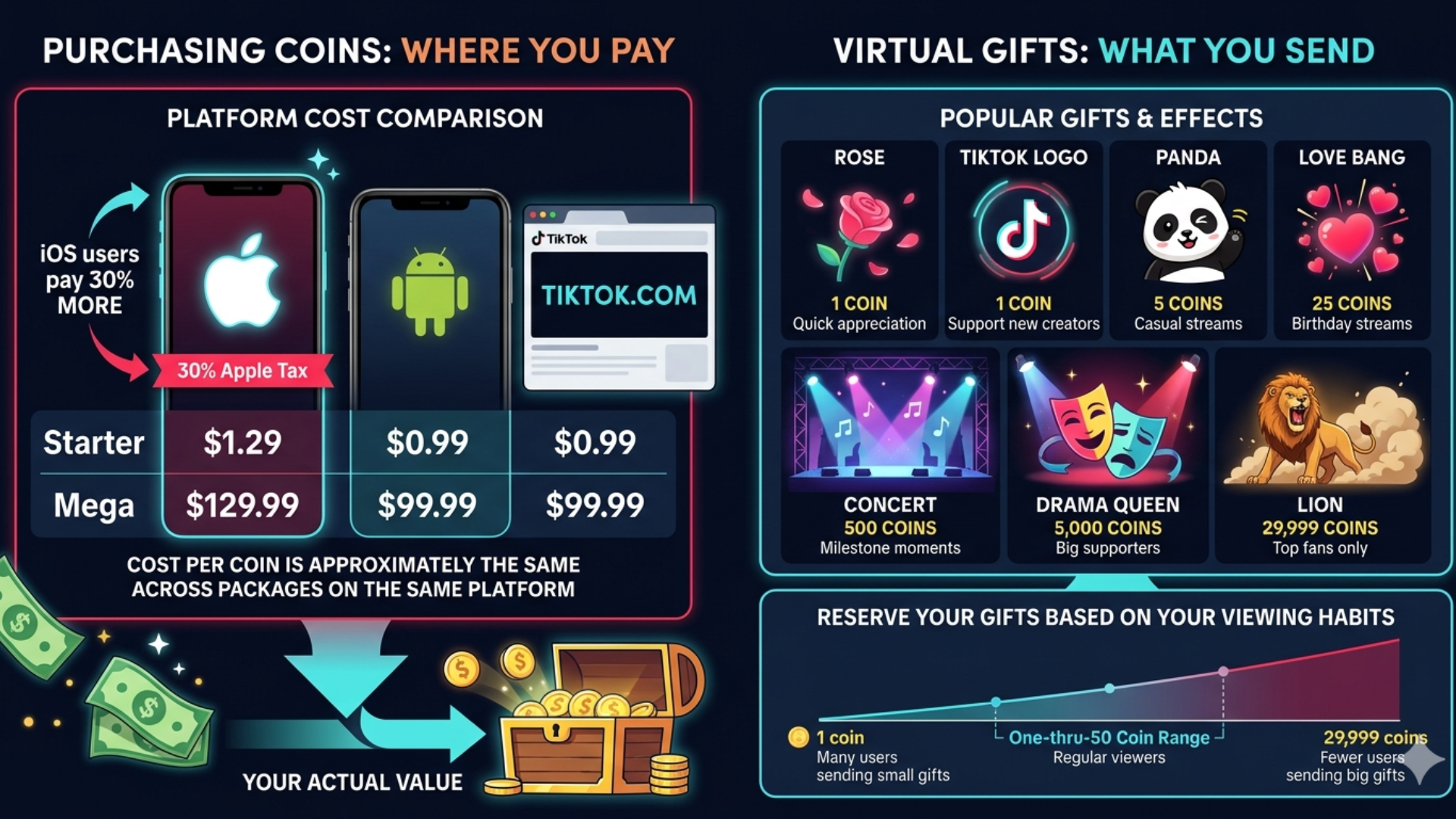
TikTok’s virtual gifting system covers all price tiers. It ranges from the low cost gift Rose, which only requires a small number of platform coins, to high-end items including Universe and Lion, that sell for hundreds of US dollars, plus mid-tier gifts commonly used in livestreams such as Drama Queen. These gifts can be converted into platform diamonds, which creators can exchange for cash to withdraw.
|
Gift |
Coins |
Effect |
When to Send |
|
Rose |
1 |
Pink rose animation |
Quick appreciation |
|
TikTok Logo |
1 |
Logo spin |
Support new creators |
|
Panda |
5 |
Cute walk |
Casual streams |
|
Love Bang |
25 |
Heart explosion |
Birthday streams |
|
Concert |
500 |
Stage lights |
Milestone moments |
|
Drama Queen |
5,000 |
Full-screen drama |
Big supporters |
|
Lion |
29,999 |
Epic roar |
Top fans only |
It’s not necessary to send a Lion to make a creator feel appreciated. A small stream’s worth of roses or pandas goes a long way. It’s fun to see that the bigger the gift, the bigger the splash on screen.
However, if you are a regular viewer, you can reserve your gifts within the one-thru-50 coin range
How to Recharge TikTok Coins
Understanding what impacts your system’s performance
On Android
Click on the profile icon and then the 3-line menu in the top right corner. Go to ‘Balance’ in your account settings.
Select your package: Select your package, your payment method, confirm, and the coins fall immediately..
On iPhone
Do the same steps as Android. Click on the Profile icon and then Settings, then Balance or Coins.
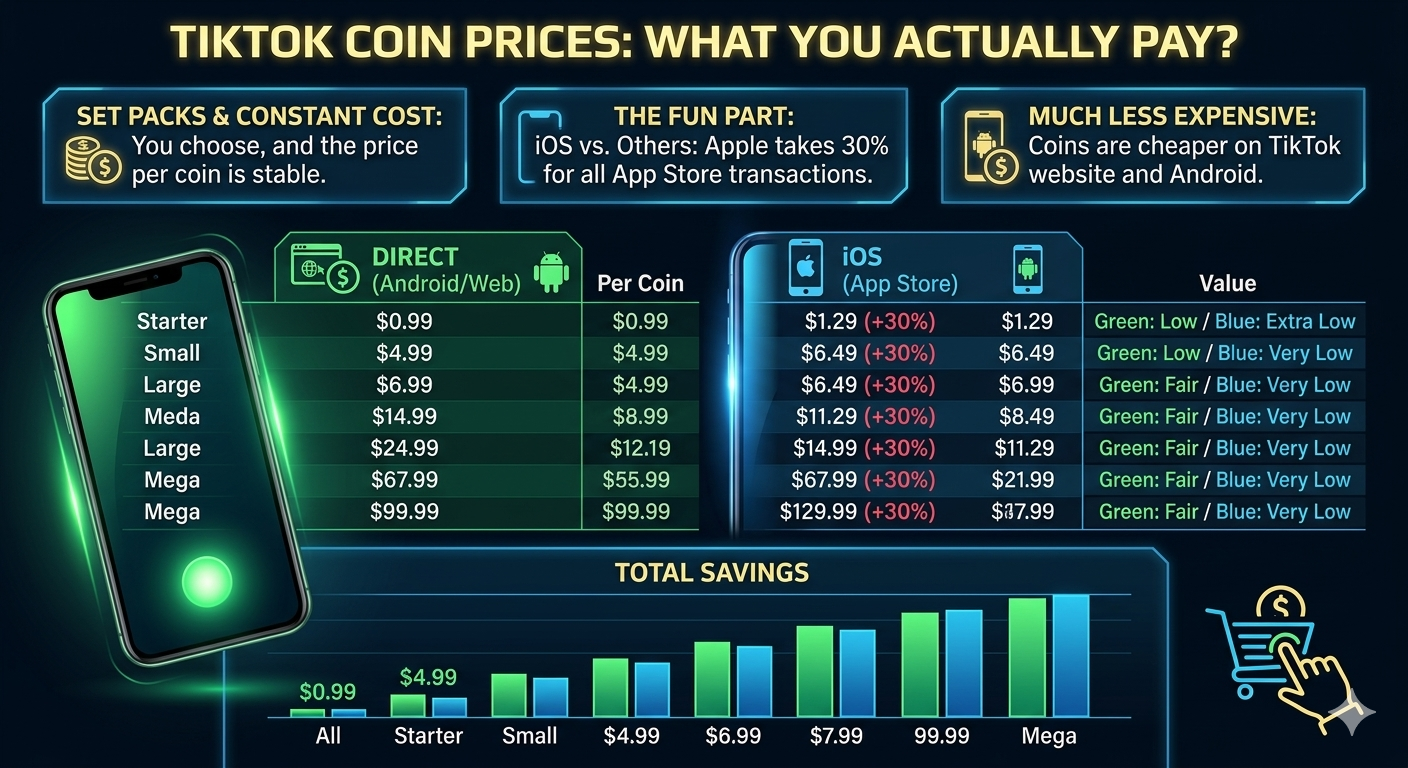
Remember: this is where Apple profits, so it is more expensive than purchasing elsewhere. If you want to save money, use the website.
On the TikTok website
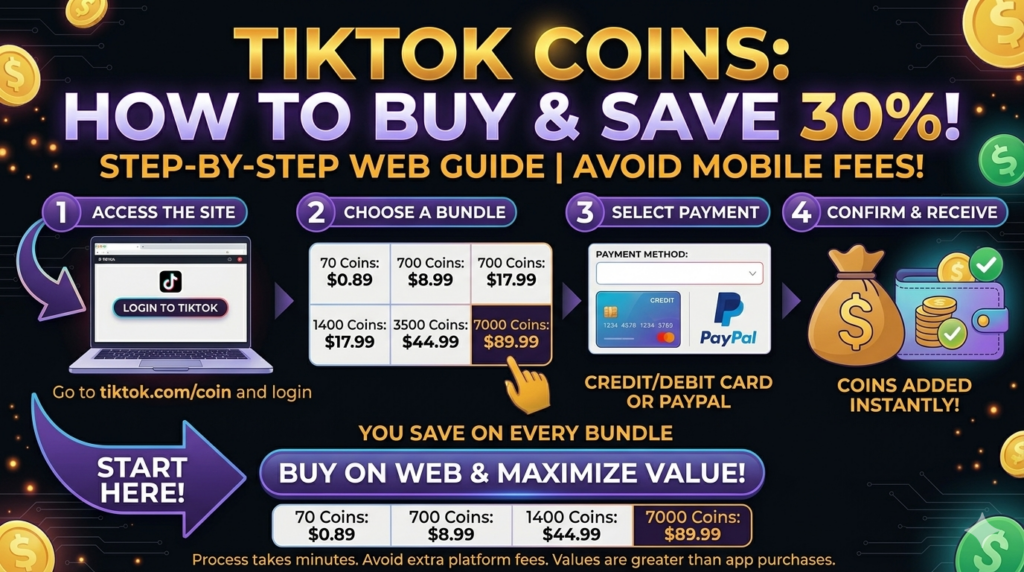
Start at tiktok.com, log in and select Coins or Recharge from the profile settings.
No additional : platform fee here since payment is made directly to TikTok. This is typically 20-30% cheaper than purchasing on the iPhone app.
Payment methods accepted.
TikTok will take Visa, Mastercard, PayPal, Google Pay and Apple Pay.
Local payment : options are also present in some countries.
On Android
Click on the profile icon and then the 3-line menu in the top right corner. Go to ‘Balance’ in your account settings.
Select your package: Select your package, your payment method, confirm, and the coins fall immediately..
On iPhone
Do the same steps as Android. Click on the Profile icon and then Settings, then Balance or Coins.
Remember: this is where Apple profits, so it is more expensive than purchasing elsewhere. If you want to save money, use the website.
On the TikTok website
Start at tiktok.com, log in and select Coins or Recharge from the profile settings.
No additional : platform fee here since payment is made directly to TikTok. This is typically 20-30% cheaper than purchasing on the iPhone app.
Payment methods accepted.
TikTok will take Visa, Mastercard, PayPal, Google Pay and Apple Pay.
Local payment : options are also present in some countries.
On Android
Click on the profile icon and then the 3-line menu in the top right corner. Go to ‘Balance’ in your account settings.
Select your package: Select your package, your payment method, confirm, and the coins fall immediately..
On iPhone
Do the same steps as Android. Click on the Profile icon and then Settings, then Balance or Coins.
Remember: this is where Apple profits, so it is more expensive than purchasing elsewhere. If you want to save money, use the website.
On the TikTok website
Start at tiktok.com, log in and select Coins or Recharge from the profile settings.
No additional : platform fee here since payment is made directly to TikTok. This is typically 20-30% cheaper than purchasing on the iPhone app.
Payment methods accepted.
TikTok will take Visa, Mastercard, PayPal, Google Pay and Apple Pay.
Local payment : options are also present in some countries.
On Android
Click on the profile icon and then the 3-line menu in the top right corner. Go to ‘Balance’ in your account settings.
Select your package: Select your package, your payment method, confirm, and the coins fall immediately..
On iPhone
Do the same steps as Android. Click on the Profile icon and then Settings, then Balance or Coins.
Remember: this is where Apple profits, so it is more expensive than purchasing elsewhere. If you want to save money, use the website.
On the TikTok website
Start at tiktok.com, log in and select Coins or Recharge from the profile settings.
No additional : platform fee here since payment is made directly to TikTok. This is typically 20-30% cheaper than purchasing on the iPhone app.
Payment methods accepted.
TikTok will take Visa, Mastercard, PayPal, Google Pay and Apple Pay.
Local payment : options are also present in some countries.
TikTok Coins : Price Comparison
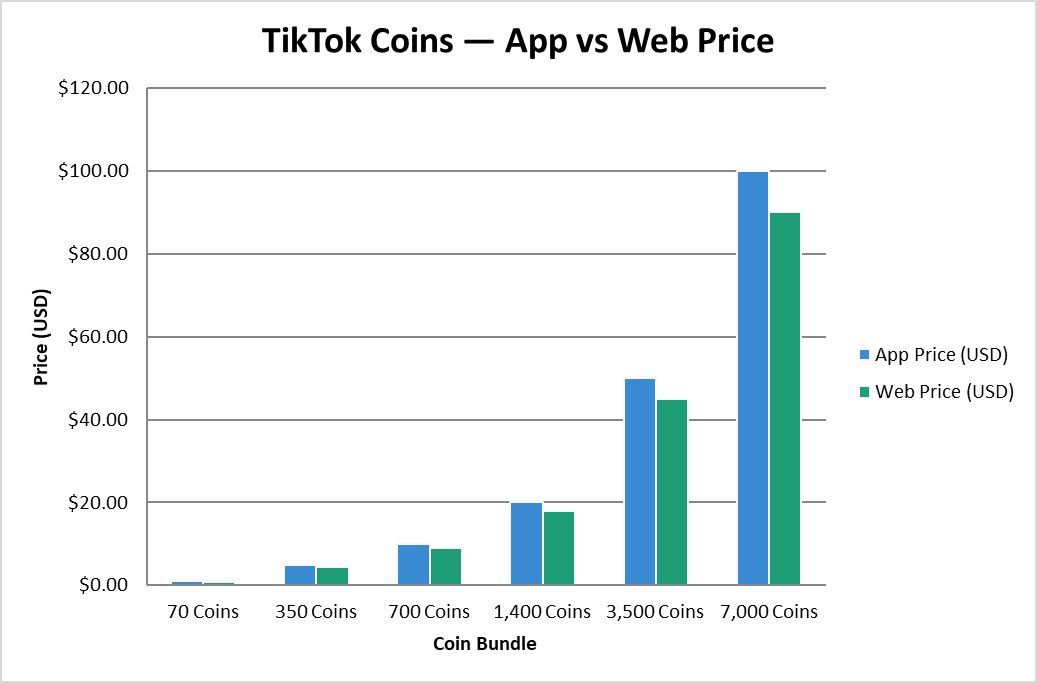
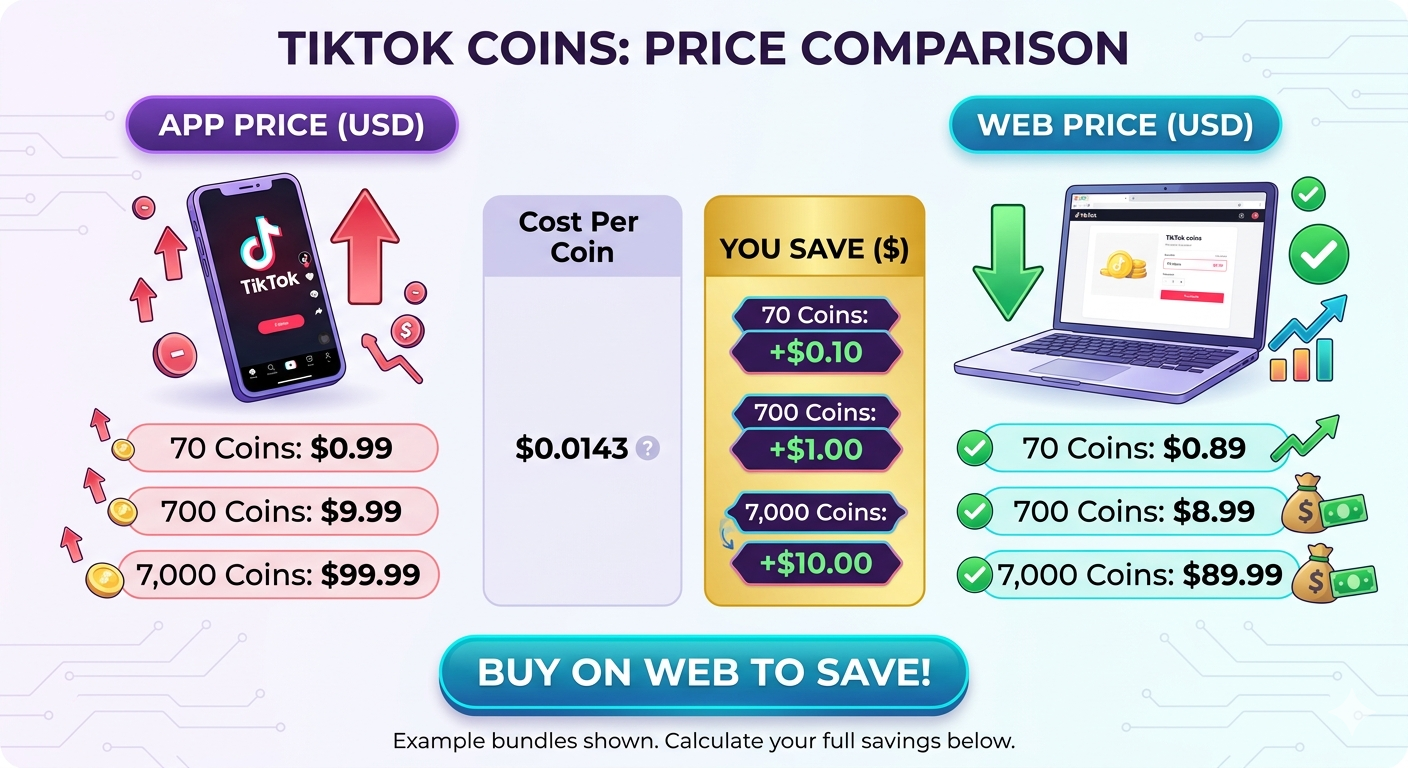
TikTok Coin prices vary by platform and region, with packages ranging from small bundles (around 70 coins) to large bulk packs of thousands of coins. Buying coins on iOS is usually pricier than on Android, since Apple adds its own in-app purchase fee on top.
|
Coin Bundle |
App Price (USD) |
Web Price (USD) |
You Save ($) |
Cost Per Coin |
|
70 Coins |
$0.99 |
$0.89 |
$0.10 |
$0.0141 |
|
350 Coins |
$4.99 |
$4.49 |
$0.50 |
$0.0143 |
|
700 Coins |
$9.99 |
$8.99 |
$1.00 |
$0.0143 |
|
1,400 Coins |
$19.99 |
$17.99 |
$2.00 |
$0.0143 |
|
3,500 Coins |
$49.99 |
$44.99 |
$5.00 |
$0.0143 |
|
7,000 Coins |
$99.99 |
$89.99 |
$10.00 |
$0.0143 |
How to buy TikTok coins
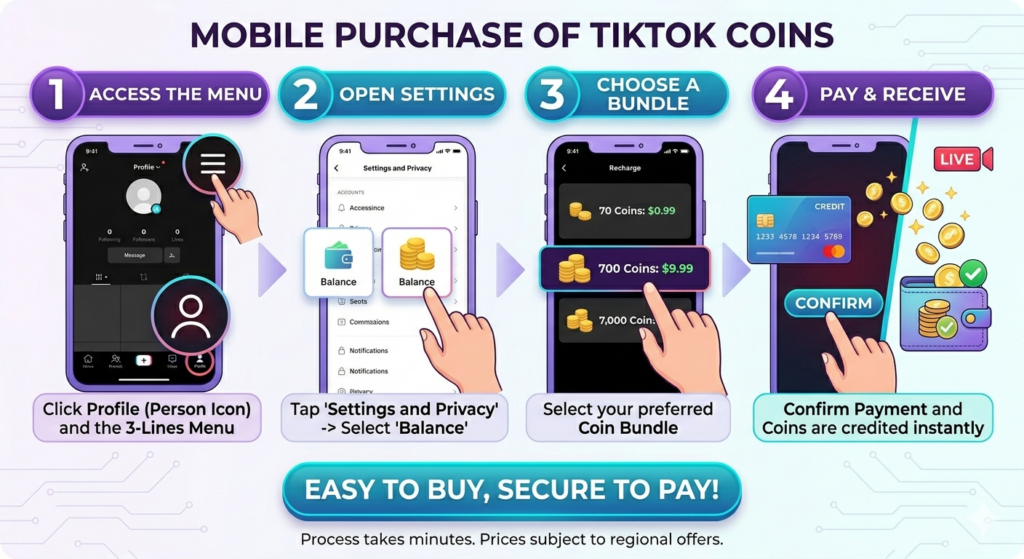
Method 1 : Step-by-Step Mobile Process
The entire TikTok Coins purchase process takes only a matter of minutes. How to do it on mobile and desktop.
Method 2: Buy via TikTok Website
Method 3 is to purchase through Authorised Third Party Resellers.
However, a first rule to always follow before clicking that buy button is to check whether the site is officially authorised or not. There are many fake resellers out there, and you definitely don’t want to waste any of your money without getting your coins.
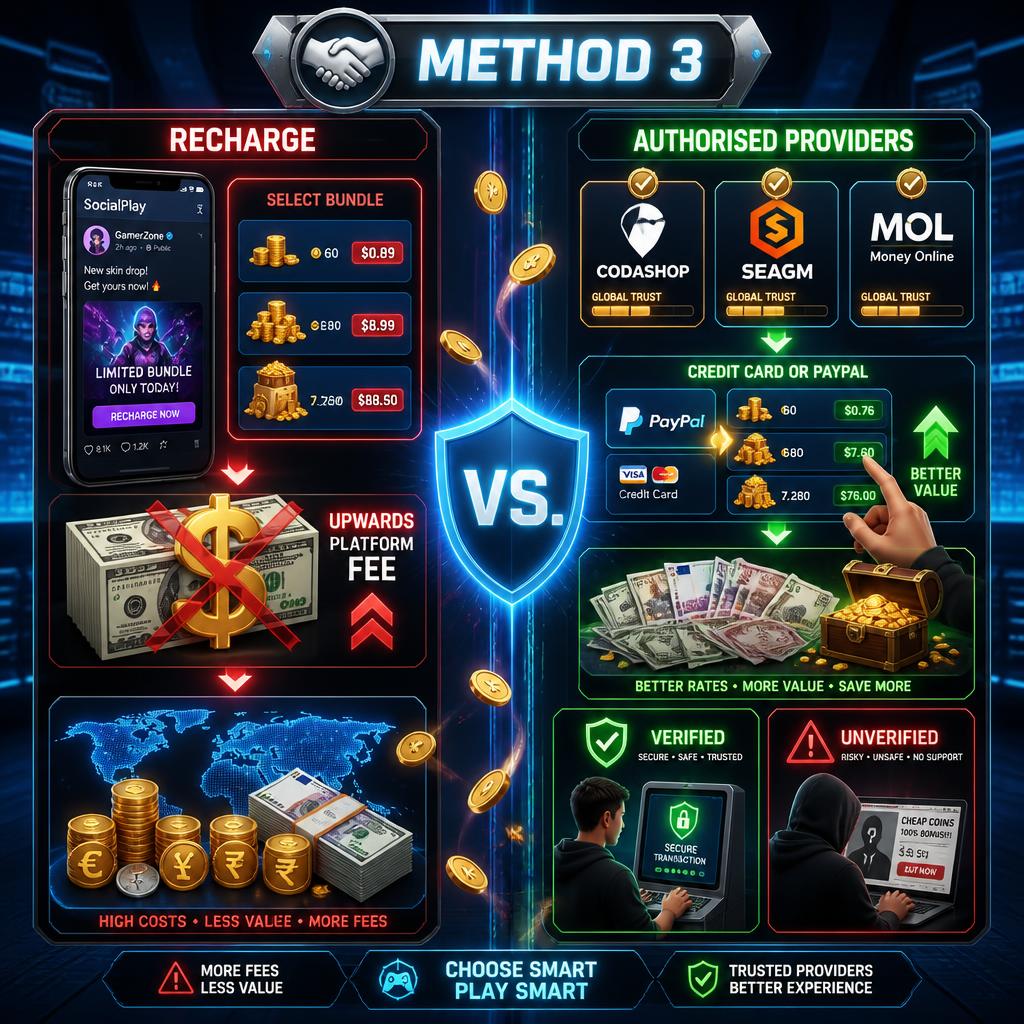
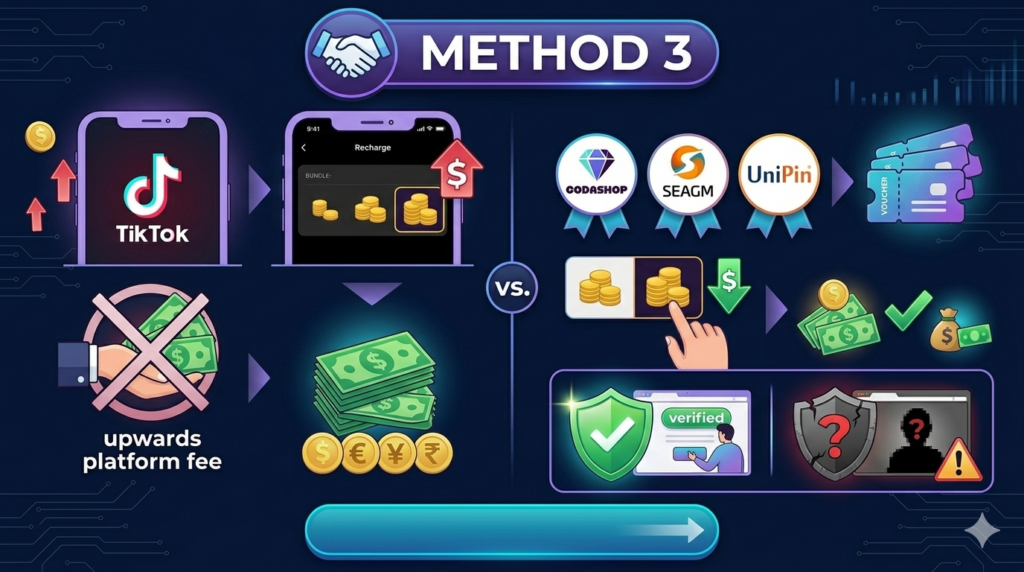
This could be a very good idea if you want to save a few dollars. One way to find the best deals is to use platforms that provide vouchers to top up your TikTok account for you, such as Codashop, Seagm,z or UniPin, which sometimes can be cheaper than purchasing through the TikTok app, especially if you live in a country where your currency appreciates against TikTok’s.
TikTok Coins Price List (United States, 2026)
The price list below is provided to help you plan ahead. The following price list is offered for your planning. The official TikTok Coin bundles and their price in USD for 2026 are provided below. TikTok doesn’t have official volume discounts, so the price per coin is fairly consistent throughout bundles.
|
Coin Bundle |
Price (USD) |
Cost per Coin |
Best For |
|
70 Coins |
$0.99 |
$0.0141 |
Trying it out |
|
350 Coins |
$4.99 |
$0.0143 |
Casual gifting |
|
700 Coins (Popular) |
$9.99 |
$0.0143 |
Regular fans |
|
1,400 Coins |
$19.99 |
$0.0143 |
Live stream tipping |
|
3,500 Coins |
$49.99 |
$0.0143 |
Super fans |
|
7,000 Coins |
$99.99 |
$0.0143 |
High-value gifting |
|
17,500 Coins (Best Value) |
$249.99 |
$0.0143 |
Dedicated supporters |
Using currently publicly available real-time retail prices
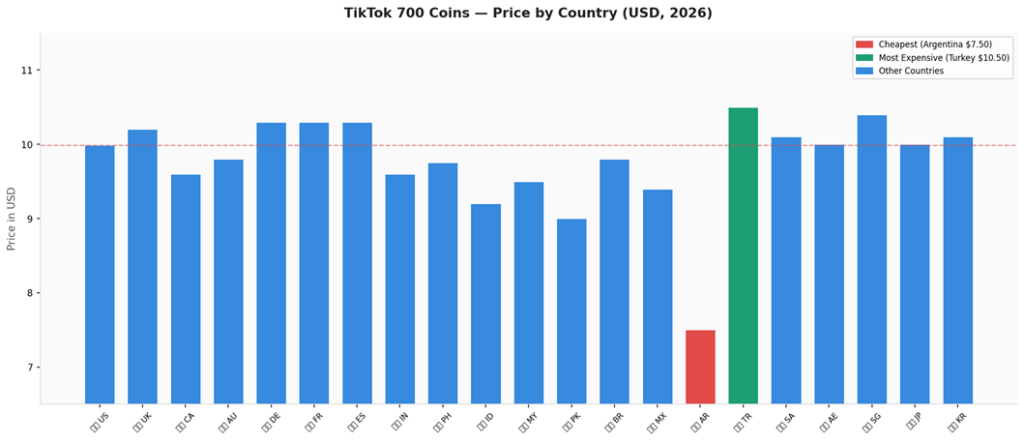
As our benchmark, we uniformly selected TikTok’s 700 coin package to conduct cross-national pricing comparisons. This package is priced at 7.25 USD in the United States and the United Arab Emirates, costs between 7.39 and 7.46 USD in Canada and Pakistan, sells for 9.03 USD in the United Kingdom, and 9.19 USD in Sweden, with significant pricing disparities across all sampled countries.
|
Country |
Local Price (700 coins) |
Approx. USD |
Cost/Coin (USD) |
Notes |
|---|---|---|---|---|
|
United States |
$9.99 USD |
$9.99 |
$0.0143 |
Base reference |
|
United Kingdom |
£7.99 GBP |
~$10.20 |
$0.0146 |
Slightly above US |
|
Canada |
CA$12.99 |
~$9.60 |
$0.0137 |
Marginally cheaper |
|
Australia |
A$14.99 |
~$9.80 |
$0.0140 |
Comparable to US |
|
Germany |
€9.49 EUR |
~$10.30 |
$0.0147 |
EU pricing |
|
France |
€9.49 EUR |
~$10.30 |
$0.0147 |
EU pricing |
|
Spain |
€9.49 EUR |
~$10.30 |
$0.0147 |
EU pricing |
|
India |
₹799 INR |
~$9.60 |
$0.0137 |
Comparable to US |
|
Philippines |
₱549 PHP |
~$9.75 |
$0.0139 |
Slight saving |
|
Indonesia |
Rp149,000 IDR |
~$9.20 |
$0.0131 |
Cheaper |
|
Malaysia |
RM42.90 |
~$9.50 |
$0.0136 |
Minor saving |
|
Pakistan |
PKR 2,799 |
~$9.00 |
$0.0129 |
Cheaper |
|
Brazil |
R$49.90 BRL |
~$9.80 |
$0.0140 |
Comparable |
|
Mexico |
MX$189 |
~$9.40 |
$0.0134 |
Minor saving |
|
Argentina |
ARS varies |
~$7.50 |
~$0.0107 |
Often Cheapest |
|
Turkey |
₺349 TRY |
~$10.50 |
$0.0150 |
Slightly higher |
|
Saudi Arabia |
SAR 37.99 |
~$10.10 |
$0.0144 |
Near-US pricing |
|
UAE |
AED 36.99 |
~$10.00 |
$0.0143 |
Same as US |
|
Singapore |
S$13.98 |
~$10.40 |
$0.0148 |
Slightly higher |
|
Japan |
¥1,500 JPY |
~$10.00 |
$0.0143 |
Same as US |
|
South Korea |
₩13,500 KRW |
~$10.10 |
$0.0144 |
Near-US pricing |
TikTok Gifts : Coin Costs & Creator Value
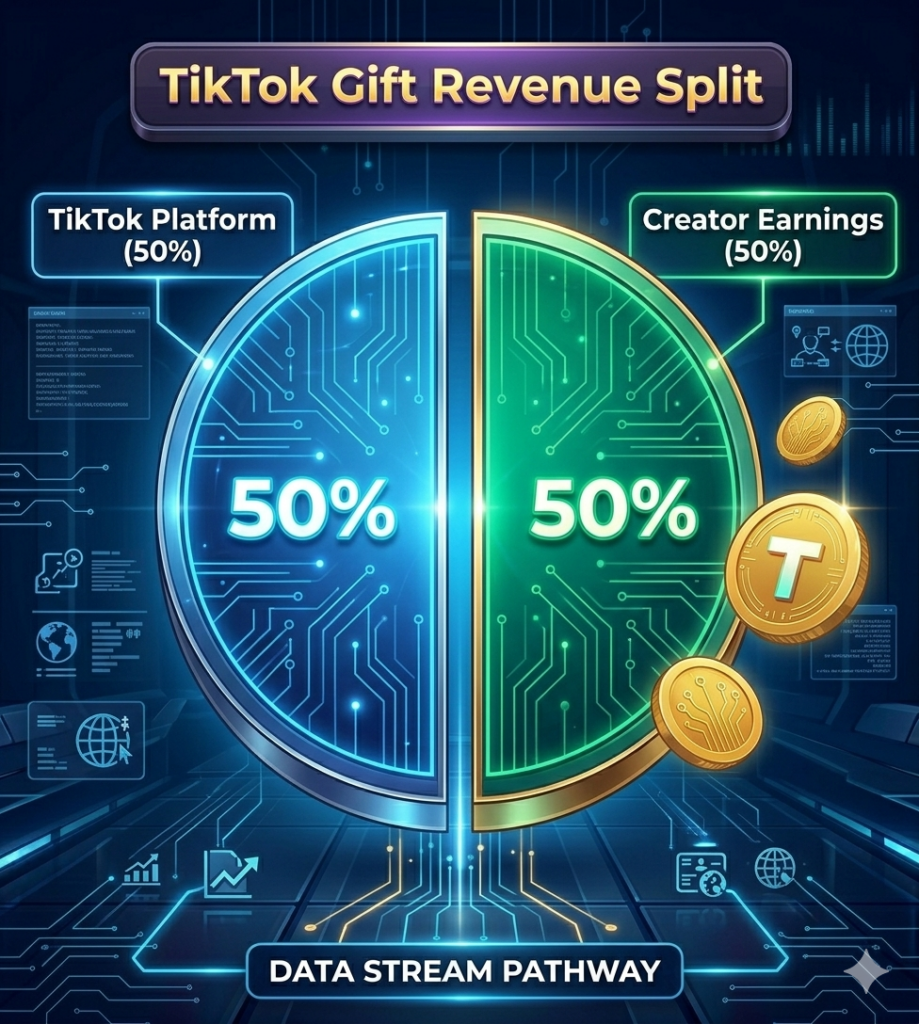
When you send a gift, TikTok converts the coin cost into Diamonds for the creator. The creator can then convert Diamonds to cash.The studio will get about half the dollar value of gifts while TikTok will get the other 50 cents as platform revenue.
|
Gift Name |
Coins Cost |
USD Cost (Buyer) |
Est. Diamonds |
Creator Earnings |
|
Rose |
1 |
$0.01 |
~0.5 |
~$0.003 |
|
Like |
1 |
$0.01 |
~0.5 |
~$0.003 |
|
TikTok |
1 |
$0.01 |
~0.5 |
~$0.003 |
|
Finger Heart |
5 |
$0.07 |
~2.5 |
~$0.013 |
|
Confetti |
10 |
$0.14 |
~5 |
~$0.025 |
|
Sunglasses |
49 |
$0.70 |
~24 |
~$0.12 |
|
Flower Bouquet |
100 |
$1.43 |
~50 |
~$0.25 |
|
Birthday Cake |
169 |
$2.42 |
~84 |
~$0.42 |
|
Diamond |
200 |
$2.86 |
~100 |
~$0.50 |
|
Gymnastics |
500 |
$7.14 |
~250 |
~$1.25 |
|
Sports Car (Popular) |
1,000 |
$14.29 |
~500 |
~$2.50 |
|
Ring |
2,500 |
$35.71 |
~1,250 |
~$6.25 |
|
Rocket |
5,000 |
$71.43 |
~2,500 |
~$12.50 |
|
Lion |
29,999 |
$428.56 |
~15,000 |
~$75.00 |
|
TikTok Universe |
34,999 |
$499.99 |
~17,500 |
~$87.50 |
How to Get Cheap TikTok Coins
The ideal choice would be to purchase on Android or Web
The App Store charges 30% in-app sales commission to Apple. This is a cost that is picked up by TikTok, but there are instances where the price on iOS may be a little bit more expensive than the purchase on Android or tiktok.com. You can save on the smallest fraction on Android or purchasing via the website.
Use Paypal or Google Pay to get Cashback.
A few credit cards (or digital wallets) campaigns give you cash back for transactions made using Google Pay or Paypal. You are getting a discount on the card, not from TikTok but your card issuers, when you purchase TikTok Coin with the 3/5% cash back.
Purchase products from Authorised Resellers
All of the sites, including the Codashop, Seagm and UniPin sites, have legitimate licenses for top-ups on TikTok. During promotions, occasionally these websites will offer extra coins or offers on coin packages. If you purchase from the app they are good to view prior to purchasing.
Wait for seasonal promotions
They also offer them promotions on holidays (11.11, Christmas, New Year etc) when they purchase in some places they receive bonus coins.
How big is the difference?
It can be quite large. The table below compares coin prices across different countries, all converted to US dollars for a fair comparison.
How to Get Cheap TikTok Coins
|
Method |
Saving |
Effort |
|
Buy via website (not iOS) |
Up to 30% cheaper |
Very easy |
|
Buy larger packages |
Slightly better rate |
Easy |
|
Catch promo events |
10–20% bonus coins |
Watch notifications |
|
Set monthly budget |
No overspend |
Self-discipline |
|
Avoid third-party sites |
Avoids scams/bans |
Just don’t use them |
|
Country |
65 Coins (USD) |
330 Coins (USD) |
660 Coins (USD) |
Compared to US |
|
United States |
$0.99 |
$4.99 |
$9.99 |
Base price |
|
United Kingdom |
$1.09 |
$5.49 |
$10.99 |
~10% more |
|
Australia |
$1.12 |
$5.60 |
$11.19 |
~12% more |
|
Germany |
$1.08 |
$5.42 |
$10.84 |
~9% more |
|
Pakistan |
$0.72 |
$3.60 |
$7.20 |
~28% less |
|
India |
$0.68 |
$3.40 |
$6.80 |
~31% less |
|
Turkey |
$0.55 |
$2.75 |
$5.50 |
~45% less |
|
Brazil |
$0.70 |
$3.50 |
$6.99 |
~30% less |
|
Indonesia |
$0.65 |
$3.25 |
$6.50 |
~35% less |
How to get free TikTok Coins?
Learn ways to earn free TikTok Coins.
How do I get free coins on TikTok?” is one of the most common queries regarding TikTok Coins. Well, so, let’s get to the point of this crap. There is no way to get TikTok Coins for free in 2026.
Other platforms have coin programs for regular users that can be earned by watching ads or completing chores within the app; TikTok hasn’t introduced any coin program yet.
TikTok creator giveaways: It is common for major creators or brand accounts to have currency giveaways as a marketing tactic. They are real but unusual and do not require any personal account data to enter.
Promotional top-up matches in some regions, sometimes TikTok or resellers promote “buy X coins, get Y bonus coins” deals.
Traditionally
TikTok has launched short-term campaigns in particular markets, also known as referral or partner programs! There could be some deals available, check the official TikTok blog or in-app notifications .
What is a VPN
Recharging Tiktok Coin Step by Step
TikTok Profile
Click on your profile picture at the bottom right corner of the App. It will lead you to your main profile page where you’ll be able to access all settings and account features.
Go to Settings & Privacy
Click on the three-lined menu at the top right. Choose “Settings and Privacy” from the selection that appears at the bottom of your screen.
Locate the Balance Section
Go to Settings and scroll down until you find the option “Balance”. Tap it. Here you can see your current coin balance and all recharging choices.
Choose Your Bundle and Tap Recharge
Press “Recharge” to see available coin bundles .To confirm the purchase, use your payment method on file – Apple Pay, Google Pay or credit card
What Is the Real Coin TikTok Value After Platform Fees.
- This is the last thing that most people consider when using a computer.
- If you give the creator a gift, you won’t be giving him/her the actual dollar amount you spent on the gift.
- TikTok pocket takes an important chunk along the way.
- Here is how the value chain works. You buy coins with real money.
- Coins are spent on gifts. Gifts convert to Diamonds on the creator’s end.
- Diamonds are then cashed out but TikTok applies a conversion rate that reduces the value by roughly 50%.
- So if you spend $10 worth of coins on a gift, the creator ultimately receives around $5 in real withdrawable earnings.
- The other $5 goes to TikTok as its platform fee. This is standard practice across gifting and tipping platforms, but it is important to understand before you spend.
|
Coins Spent (Fan) |
Real USD Spent |
Diamonds Creator Gets |
Creator Cash Value |
|
100 Coins |
~$1.51 |
50 Diamonds |
~$0.25 |
|
500 Coins |
~$7.55 |
250 Diamonds |
~$1.25 |
|
1,000 Coins |
~$15.10 |
500 Diamonds |
~$2.50 |
|
5,000 Coins |
~$75.50 |
2,500 Diamonds |
~$12.50 |
|
10,000 Coins |
~$151.00 |
5,000 Diamonds |
~$25.00 |
Popular TikTok Gifts and Their Coin Costs Explained
There are dozens of virtual gifts available on TikTok that cost a variety of coins. There are small gifts that are symbolic. There are also costly and moving others.
|
Gift Name |
Coin Cost |
Total Value (USD) |
Creator Earns (After 50%) |
|---|---|---|---|
|
Rose |
1 coin |
$0.013 |
$0.0065 |
|
TikTok |
1 coin |
$0.013 |
$0.0065 |
|
Panda |
5 coins |
$0.065 |
$0.0325 |
|
Italian Hands |
5 coins |
$0.065 |
$0.0325 |
|
Love Bang |
25 coins |
$0.325 |
$0.16 |
|
Sun Cream |
50 coins |
$0.65 |
$0.325 |
|
Rainbow Puke |
100 coins |
$1.30 |
$0.65 |
|
Drama Queen |
5,000 coins |
$65.00 |
$32.50 |
|
Lion |
29,999 coins |
$389.99 |
$194.99 |
|
Galaxy |
1,000 coins |
$13.00 |
$6.50 |